Vialux DMD
Pieces for interacting with Vialux Digital Micromirror Devices (DMDs) using ALP4lib and the puzzlepiece framework.
Example usage (see Getting started for more details on using Pieces in general):
import puzzlepiece as pzp
from pzp_hardware.vialux import dmd

app = pzp.QApp()
puzzle = pzp.Puzzle(debug=False)
puzzle.add_piece("dmd", dmd.Piece, row=0, column=0)
puzzle.show()
app.exec()
Installation
Install the Vialux software from http://www.vialux.de/en/ or a USB key that came with your hardware.
Locate the ALP DLLs in the Vialux software’s installation directory – this will depend on your ALP version, look for a folder similar to
C:\Program Files\ALP-4.4\ALP-4.4 API\x64.Install ALP4lib in your Python environment with
pip install ALP4lib, or wait to be prompted to install it at runtime. See https://github.com/wavefrontshaping/ALP4lib for more.Provide the path to ALP DLLs when prompted at runtime.
Requirements
This Piece has additional requirements. You will be asked to install them at runtime, or you may choose to install them ahead of time.
ALP4 –
pip install ALP4lib– Instructions
Available Pieces
- class pzp_hardware.vialux.dmd.Piece(puzzle, *args, **kwargs)[source]
Bases:
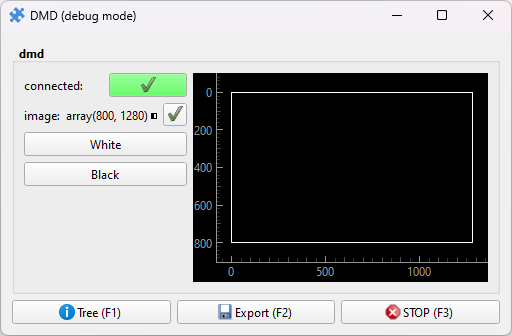
ImagePreview,PieceBasic Piece for controlling a Vialux DMD. Allows setting any image array to the DMD, and quickly making it fully black or white. Have a look at
pzp_hardware.generic.patterning.patternsfor a quick way to display test patterns.Note that by default this image will run at 30fps, with very short periods of the DMD resetting between the frames.
- class pzp_hardware.vialux.dmd.AdvancedPiece(puzzle, *args, **kwargs)[source]
Bases:
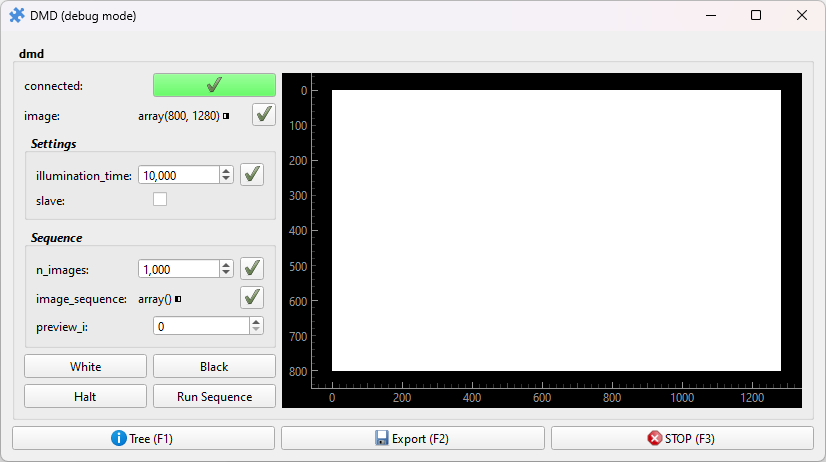
PieceAn advanced Piece for controlling a Vialux DMD. Just as
pzp_hardware.vialux.dmd.Piece, it allows setting any image array to the DMD, and quickly making it fully black or white. In addition, the frame timing and slave mode can be controlled, enabling externally triggered operation.The image sequence feature allows loading a set of images onto the DMD, which it will run through in sequence (with internal or external triggering). For example:
# Stop the DMD before dealing with image sequences
puzzle["dmd"].actions["Halt"]()
# Prepare the DMD to receive a sequence of 10 images
puzzle["dmd:n_images"].set_value(10)
# Set the illumination time to 10ms (param units are us, matching the API)
puzzle["dmd:illumination_time"].set_value(10*1000)
# Set the image sequence
puzzle["dmd:image_sequence"].set_value(np.zeros((10, puzzle["dmd"].size_y, puzzle["dmd"].size_x), np.uint8))
# Run the sequence in a loop (by default the sequence only runs once)
puzzle["dmd"].actions["Run Sequence"](loop=True)