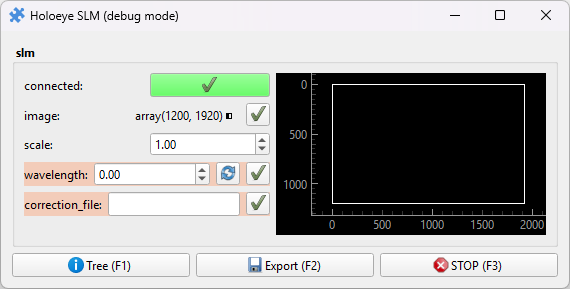
Holoeye SLM
Pieces for interacting with Holoeye SLMs using the puzzlepiece framework.
Example usage (see Getting started for more details on using Pieces in general):
import puzzlepiece as pzp
from pzp_hardware.holoeye import slm

app = pzp.QApp()
puzzle = pzp.Puzzle(debug=False)
puzzle.add_piece("slm", slm.Piece, row=0, column=0)
puzzle.show()
app.exec()
Installation
Install the SLM SDK. You may have to register your SLM at https://customers.holoeye.com/ to get a download link.
When you first initialise the Piece, you will be prompted for two directories: the Python examples directory (
C:\Program Files\HOLOEYE Photonics\SLM Display SDK (Python) v4.1.0\examples) and the Python API directory (C:\Program Files\HOLOEYE Photonics\SLM Display SDK (Python) v4.1.0\api\python). Accepting the defaults should be ok in most cases, and you will be prompted if the directories are not found. If your SDK is installed in a non-standard location, provide the correct directories when prompted.
Requirements
This Piece has additional requirements. You will be asked to install them at runtime, or you may choose to install them ahead of time.
HEDS – Instructions
hedslib – Instructions
Available Pieces
- class pzp_hardware.holoeye.slm.Piece(puzzle=None, custom_horizontal=None, param_defaults=None, *args, **kwargs)[source]
Bases:
ImagePreview,PiecePiece for controlling a HOLOEYE SLM. Allows setting any image array to the SLM. Have a look at
pzp_hardware.generic.patterning.patternsfor a quick way to display test patterns.