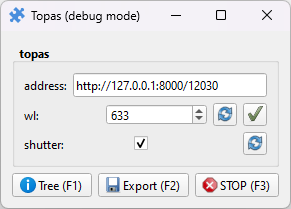
Topas OPA control
Pieces for interacting with Topas Optical Parametric Amplifiers using the puzzlepiece framework.
Example usage (see Getting started for more details on using Pieces in general):
import puzzlepiece as pzp
from pzp_hardware.lightcon import topas

app = pzp.QApp()
puzzle = pzp.Puzzle(debug=False)
puzzle.add_piece("topas", topas.Piece, row=0, column=0, param_defaults={
    "address": "http://127.0.0.1:8000/12030" # optionally specify a default IP address
})
puzzle.show()
app.exec()
Installation
Find the IP address and port corresponding to the Topas Server. This should be of the form “http://{ip_address}:8000/{serial_number}”. The IP address is of the computer that the Topas4 server is running on, or 127.0.0.1 if it’s running on the same computr as the Piece. The OPA’s serial number is listed in the WinTopas4 application, as well as the Topas4 server. All together, the URL should look like “http://127.0.0.1:8000/12030”.
Install the
requestslibrary with pip, or wait to be prompted for automatic installation when first running the Piece.Paste the network address and port you found in the “address” text box, or see above for setting it as the default in
add_piece.
Requirements
This Piece has additional requirements. You will be asked to install them at runtime, or you may choose to install them ahead of time.
requests –
pip install requests– Instructions