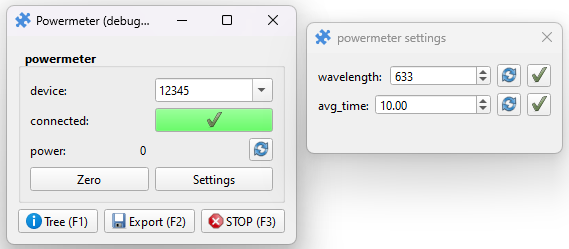
ThorLabs Powermeter
Pieces for interacting with ThorLabs powermeter consoles using the puzzlepiece framework.
Example usage (see Getting started for more details on using Pieces in general):
import puzzlepiece as pzp
from pzp_hardware.thorlabs import powermeter

app = pzp.QApp()
puzzle = pzp.Puzzle(debug=False)
puzzle.add_piece("powermeter", powermeter.Piece, row=0, column=0)
puzzle.show()
app.exec()
Installation
Install the ThorLabs Optical Power Monitor (OPM) software from https://www.thorlabs.com/software_pages/ViewSoftwarePage.cfm?Code=OPM
Make sure your powermeter console is using the
TLPMorWinUSBdriver, this can be done using the “Driver Switcher” app installed with the OPM software.The OPM software will install relevant files in two locations, a 32bit and a 64bit one.
Locate the TLPM Python examples directory, usually
C:\Program Files (x86)\IVI Foundation\VISA\WinNT\TLPM\Examples\Python(this will always be in the 32bit installation folder, so ‘Program Files (x86)’).Locate the TLPM DLL directory, which will be either in ‘Program Files’ on 64 bit systems, or in ‘Program Files (x86)’ on 32bit systems. It will be of the form
C:\Program Files\IVI Foundation\VISA\Win64\Bin.
Copy the paths of the above directories and paste them into the terminal when prompted at runtime.
Requirements
This Piece has additional requirements. You will be asked to install them at runtime, or you may choose to install them ahead of time.
TLPM – Instructions